Short answer: A sales funnel tracks a lead until they say yes. A claim pipeline has to keep working after that — through inspection, adjuster approval, production, and final payment — which is why a claims CRM needs pipeline stages built for the job, not a funnel borrowed from sales software.
I build CRM For Claims, and one of the most common things I hear from a roofing or restoration owner switching off a generic tool is some version of "the pipeline doesn't match how the job actually moves." That's not a complaint about colors or button placement. It's the tool describing a different kind of work than the one happening on the ground.
What's the actual difference between a sales funnel and a claim pipeline?
A sales funnel moves a lead toward one outcome — a signed deal — and ends there. A claim pipeline keeps tracking the same job through inspection, adjuster review, approval, production, and payment, because the work and the money keep changing hands after the "yes."
Most CRMs, including the general-purpose ones a lot of contractors start with, were built for a world where the deal closing is the finish line. Retail sales, real estate, SaaS subscriptions — the pipeline stages are some version of Lead → Qualified → Proposal Sent → Negotiation → Closed Won. Once a deal is closed, the CRM's job is basically done. Maybe it hands off to a separate delivery or fulfillment system, maybe it just marks the record inactive.
A roofing or restoration claim doesn't work that way. Signing the customer isn't the finish line — it's closer to the starting gun. After that there's an inspection to schedule, an estimate to write and often revise, an adjuster who has to review and approve (or push back on) that estimate, a production schedule to run, a final walkthrough, and an invoice that usually has more than one payer. Trying to track all of that inside a pipeline that ends at "Closed Won" means the real work is happening somewhere the CRM can't see.
Why does forcing claim work into a sales pipeline actually cause problems?
It causes problems because the stages after signing get invented, not designed — teams bolt on tags, notes, or side spreadsheets to track adjuster status and production, and none of that lives in the system of record or triggers anything automatically.
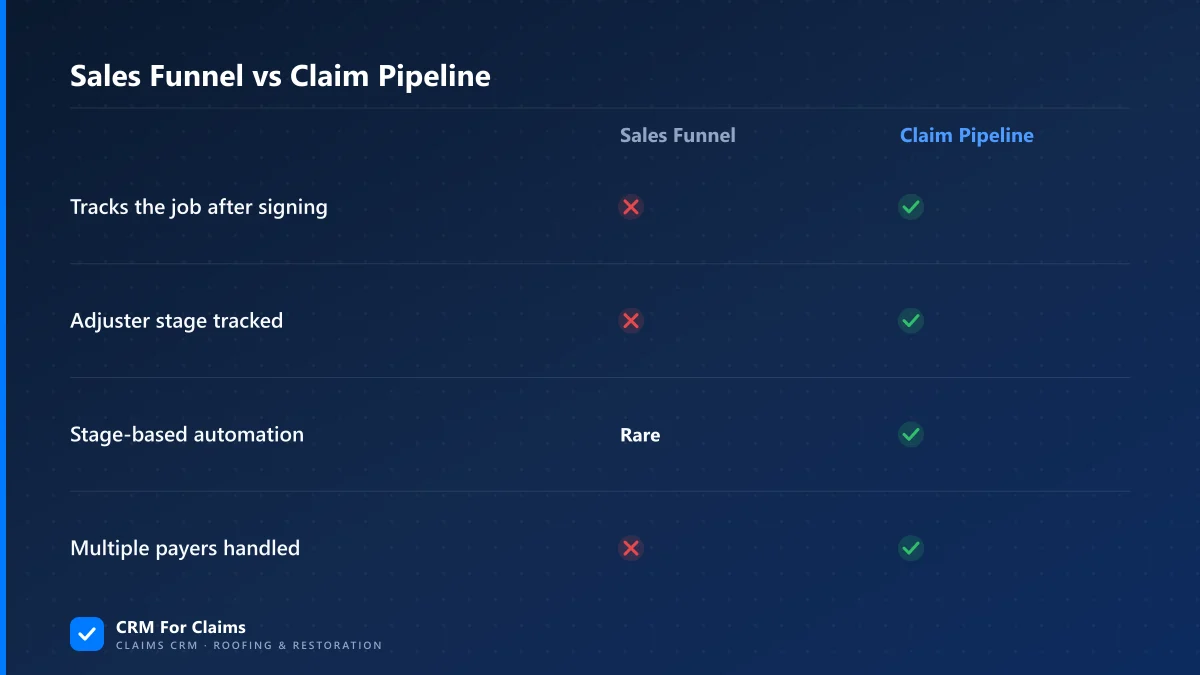
I've seen this play out a few predictable ways. A "Closed Won" deal gets a custom tag like "Awaiting Adjuster" added after the fact, because there's no real stage for it — so reporting on how many jobs are stuck waiting on an adjuster means someone manually filtering by tag instead of just looking at a pipeline column. Or the estimate and the adjuster's approved scope live in two different documents nobody reconciles until the invoice stage, when the mismatch turns into a supplement fight. Or the job's status only lives in one person's head, because the tool that's supposed to hold it stopped being useful the moment the deal closed.
None of this is a training problem. It's a structural mismatch: a sales funnel and a claim pipeline aren't the same shape, and treating the second like it's a variation of the first means the tool actively works against how the job moves.
| Sales funnel stage logic | Claim pipeline stage logic |
|---|---|
| Ends at the signed deal | Signed deal is roughly the midpoint |
| One decision-maker (the buyer) | Customer, adjuster, and sometimes a carrier all gate progress |
| Stage change = a person moves a card | Stage change is often triggered by an external event (adjuster approval, signed doc) |
| Payment is usually a single event | Payment can split across deductible, insurer, and supplements |
What should a claim pipeline's stages actually look like?
A claim pipeline should mirror the real steps a job goes through — intake, inspection, estimate/adjuster review, approved and scheduled, in production, and invoiced/paid — with each stage able to trigger the task, message, or document that stage actually needs.
The exact stage names vary by company, and that's fine — the point isn't a universal template, it's that the stages exist as first-class parts of the pipeline instead of workarounds layered on top of one. In CRM For Claims, each stage can carry its own automation: moving a claim into "Adjuster Review" can fire a task to follow up in five business days; moving it into "Approved" can trigger the production scheduling task and an SMS to the customer. That's the practical payoff of matching the pipeline to the job — the CRM starts doing work at each real step, not just recording that a step happened after the fact.
This is also where a claims-first CRM earns its keep over a generic one. A pipeline that already understands "this job is waiting on an adjuster" as a real, distinct state can report on it, remind someone about it, and route the next action — a pipeline that only understands "closed" cannot.
Does the pipeline need to track the adjuster and carrier as part of it?
Yes — an adjuster's decision is usually what moves a claim from one stage to the next, so the pipeline needs the adjuster and carrier attached as real participants on the job, not just a note in the file.
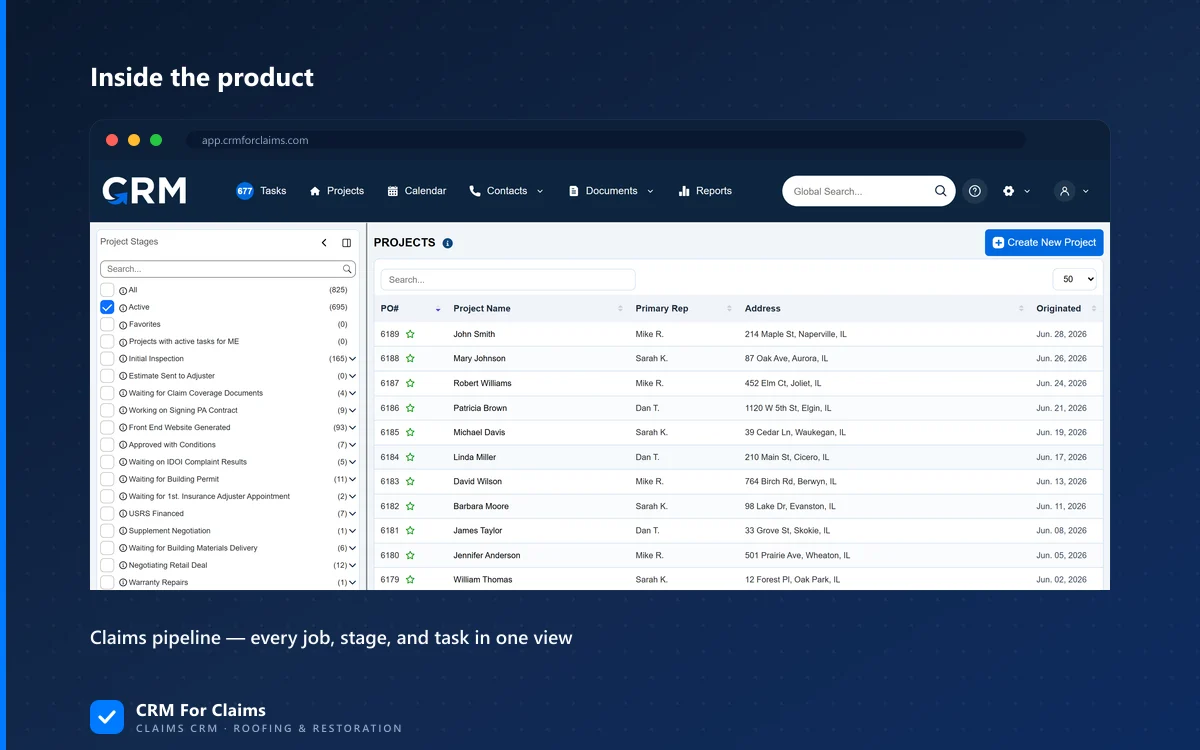
A sales pipeline generally has one external party to track: the buyer. A claim has at least two, and their timing doesn't match the customer's. The adjuster might take two weeks to approve a scope while the customer is calling every other day asking what's next. If the pipeline can't hold "waiting on adjuster" as its own stage with its own contact attached, that distinction disappears into generic notes, and nobody can answer "how many jobs are we actually stuck on right now, and why" without opening every file.
This is the same reasoning behind treating adjuster conversations as part of the claim record instead of letting them live in someone's inbox — the pipeline and the communication both need to reflect that a claim has more than one gatekeeper.
Is it ever fine to just use a generic sales pipeline for claim work?
It can be, for a very small, very simple operation — a solo operator doing a handful of straightforward jobs a month with no adjuster complexity can track most of it in a basic pipeline and their head. Once adjuster timelines, multiple payers, or a small team enter the picture, the mismatch starts costing real time.
I'd rather say that plainly than pretend every roofing or restoration business needs a specialized tool on day one. If you're doing five jobs a month, self-pay retail work with no insurance component, a generic pipeline with a "Closed Won" stage might genuinely be enough — the complexity a claims pipeline solves for isn't there yet. The signal to move off it isn't a fixed job count, it's whether you're already inventing workarounds: tags for adjuster status, a side spreadsheet for production scheduling, sticky notes for who's waiting on what. Those workarounds are the pipeline telling you it's the wrong shape for the work.
- Stage count isn't the goal — matching the real steps is. A pipeline with 12 stages nobody uses correctly is worse than one with 6 that people trust.
- Automation belongs on the stage, not the person — if moving a claim to "Approved" should always trigger a production task, that should happen because of the stage, not because someone remembered.
- Reporting should answer "why is this stuck" in one view — if that requires opening files or asking around, the pipeline isn't doing its job.
None of this requires expensive software to fix on paper — you could sketch the right stages on a whiteboard for free. What a claims-first CRM adds is making those stages actually run the work: routing tasks, logging the adjuster's response, and keeping the invoice tied to what was approved, all without someone rebuilding that structure by hand every week. If you want to see what that looks like against the pipeline you're running today, book a live walkthrough and bring one real claim to trace through it.