Short answer: A generic CRM's monthly bill is not what it actually costs you. The real cost of generic CRM workarounds is the invisible layer you build to make it fit claims work — renamed fields, a second subscription to bridge what it cannot do, a side spreadsheet for the exceptions, and one person who quietly becomes the only one who understands how it all holds together.
I build CRM For Claims, and the sales pitch I hear most often from teams considering us is not "our CRM is too expensive." It is "we already have a CRM, we just had to build a lot around it." That sentence is doing a lot of work. Every generic CRM workaround starts small and reasonable — rename a field, add a Zapier step, keep a side sheet for the one thing the software will not track — and none of it shows up on an invoice. It shows up in time, in mistakes, and in what happens the day the person who built the workaround is out sick or gone for good.
What actually counts as a workaround?
A workaround is anything you built to make a generic tool do something claims-specific it was not designed to do — a renamed field standing in for a real feature, a separate app bridging a gap, or a spreadsheet tracking what the CRM cannot. If it needs a human to remember it exists, it is a workaround, not a feature.
On its own, one workaround is nothing. Renaming a "company" field to "carrier" takes five minutes. Adding a Zapier step to text a customer when a deal moves stages takes an afternoon. The trouble is that claims work generates workarounds constantly, because a generic CRM was never modeling a claim in the first place — it was modeling a sales deal, and a deal and a claim behave differently enough that almost every screen needs a patch. Five minutes here, an afternoon there, and eighteen months in, a team is running four or five of these patches at once, each maintained by whoever happened to set it up.
Where does the real cost actually show up?
The real cost shows up in three places: the time spent maintaining each workaround, the mistakes that happen when a patch is skipped or forgotten, and the risk concentrated in whoever built it. None of these appear as a line item, which is exactly why they get underpriced against a CRM's sticker price.
Take the renamed-field trick. It looks free — no new subscription, no new login. But a renamed field does not gain any of the behavior a real feature would have. It cannot filter "show me every claim where the adjuster hasn't responded in five days" unless someone builds that view by hand, and it will not stop a new hire from typing a carrier's name into the wrong field format, because nothing about the field enforces it is a carrier at all. The cost is not the rename — it is every future minute spent working around a field that only looks like the thing you need.
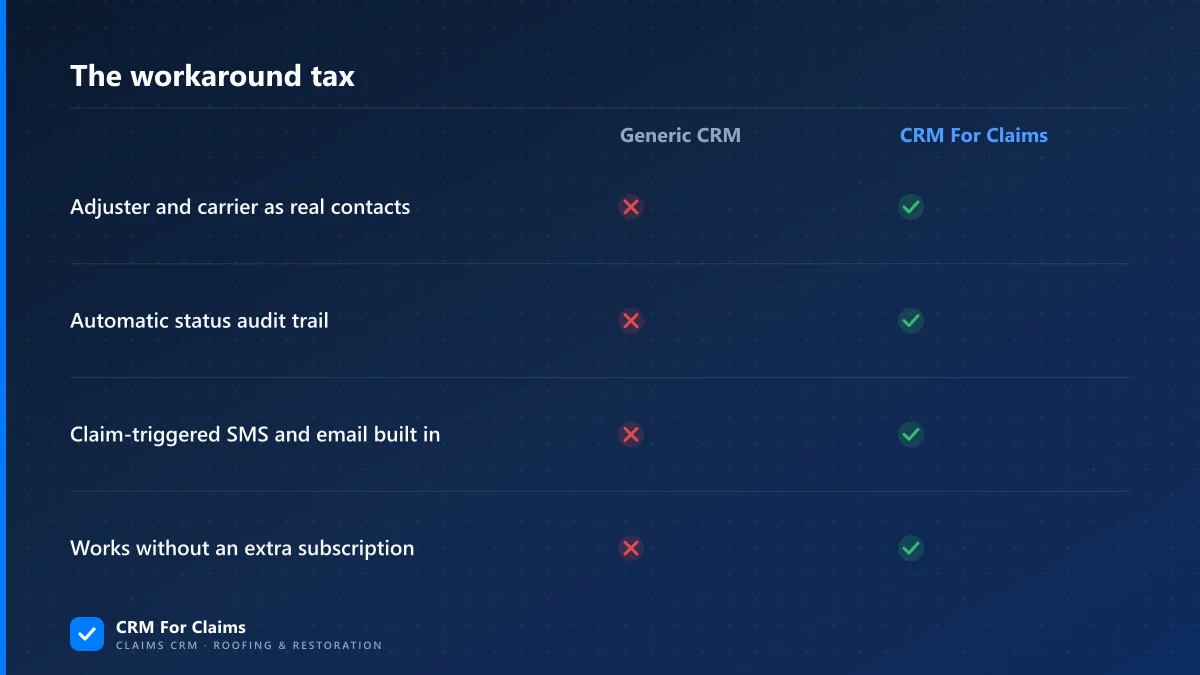
| What you're checking | Generic CRM + workarounds | Claims-built CRM |
|---|---|---|
| Adjuster and carrier as real contact types | No — renamed fields standing in | Yes |
| Automatic audit trail of every status change | No — depends on who remembered to log it | Yes |
| Claim-triggered SMS and email, no extra tool | No — usually needs a separate app or Zapier | Yes |
| One person understands how it's wired together | Usually true — that's the risk | Not applicable — it's built in |
Why does one person always end up owning the workaround?
Because setting up a workaround takes initiative, and once someone takes that initiative once, they become the default person for every question about it after. Nobody assigns this role on purpose — it happens because the person who built the Zapier step is the only one who knows what it does when it breaks.
This is the part that costs the most and gets noticed the least, because it is invisible right up until the moment it is not. The office manager who set up the "notify customer on stage change" automation goes on vacation, and a customer does not get a message they were expecting. The admin who built the adjuster-tracking spreadsheet leaves the company, and the next hire has no idea the spreadsheet is where half the claim status actually lives, because the CRM itself never showed it. None of this is a software failure — the CRM did exactly what it was configured to do. It is an organizational risk that a workaround creates by design, because a patch, unlike a real feature, was never meant to be understood by everyone on the team.
Is it ever fine to just live with the workarounds?
Yes — if claim volume is low, workarounds are genuinely the cheaper option. A handful of active claims a month is not enough volume to justify re-platforming, and a well-documented spreadsheet or two can absolutely hold that together without becoming a liability.
This is worth saying plainly, because a builder's blog post always has an incentive to make the workarounds sound worse than they are. If a solo operator is running three or four claims a month, the honest advice is to keep doing what works and not add a new subscription and a learning curve to solve a problem that is not actually costing much time yet. The math changes with volume, not with principle — the same renamed field that is harmless at four claims a month becomes the thing someone has to explain to every new hire once you're running forty. If you're weighing exactly when that tipping point hits for your team, our guide to what to move off spreadsheets first covers the same decision from the migration side.
What should you actually count before deciding if the workarounds are worth it?
Count three things honestly: how many separate tools or sheets currently hold claim information the CRM should hold, how many people could explain how each one works if asked cold, and how much time gets spent per week keeping them in sync with the CRM itself. If the answer to the second question is "one person," that alone is worth fixing regardless of the time cost.
- Tool count — every subscription, spreadsheet, or shared doc that exists because the CRM could not do something a claim needed.
- Bus factor — how many people on the team could pick up each workaround with zero notice, honestly assessed.
- Weekly sync time — the real hours spent copying, checking, or reconciling data between the CRM and the workaround, not the estimate someone gives from memory.
- What breaks silently — whether a missed sync shows up immediately, or only weeks later when a customer or adjuster notices first.
None of these show up in a demo, which is exactly why they get missed during the buying decision — a demo shows you the software working, not the six months of small patches that come after. The honest comparison is not "what does this CRM cost per month" against "what does our current CRM cost per month." It is that number plus every workaround built on top, weighed against a system where adjusters, carriers, documents, and automation are already native — see our features page for exactly what ships without a patch, or run the numbers side by side on our comparison page.
What does switching away from the workarounds actually look like?
It looks like moving the active claims and the contacts attached to them, not a full rebuild of years of history. The workarounds get retired one at a time as the CRM absorbs what they were covering for — the renamed field first, since it is the easiest to replace, then whatever the side spreadsheet was tracking.
The team that gets the most value out of retiring workarounds is not always the biggest one. It is the team where one person has quietly become the system, and where that person knows it. If that describes your office, the fastest way to see what changes is to bring your actual workaround list to a call and have someone walk through which of it a claims-built CRM already replaces — book a live walkthrough and bring the real list, not a hypothetical one. Plans and per-user pricing are on our pricing page if you want the numbers before the call.