Short answer: Split the money side of a claim in two. Nearly everyone working the job needs the approved scope — what the carrier agreed to pay for, line by line. Nearly nobody outside the office needs your costs, margin, pay rates or commissions. Most permission arguments in a contracting business happen because those two things sit on one screen.
I build CRM For Claims, and roles and permissions is the setup step teams put off the longest. It is not hard work. It is just work that produces nothing visible on the day you do it, so the first admin account becomes everybody's account, and eighteen months later a crew lead can open the invoice history for a job he was never on.
The question that actually needs answering is narrower than "who gets access to what". It is: who on this team needs to see the money on a claim, and which money. Once you separate the numbers instead of treating them as one block, most of the decision makes itself.
What counts as the money side of a claim?
Five different things, and they are nowhere near equally sensitive. The approved scope the carrier signed off. The settlement math behind it. What the homeowner still owes. What the job is costing you. And what it earns — including who earns a commission on it. A single "financials" toggle forces you to treat all five the same.
| Money item | What it tells the person reading it | Who genuinely needs it |
|---|---|---|
| Approved scope, line by line | What was actually paid for, and therefore what to build | Estimator, production manager, crew lead on that job |
| Settlement math (replacement cost, actual cash value, depreciation) | How much the carrier releases and in how many payments | Estimator or claims specialist, office |
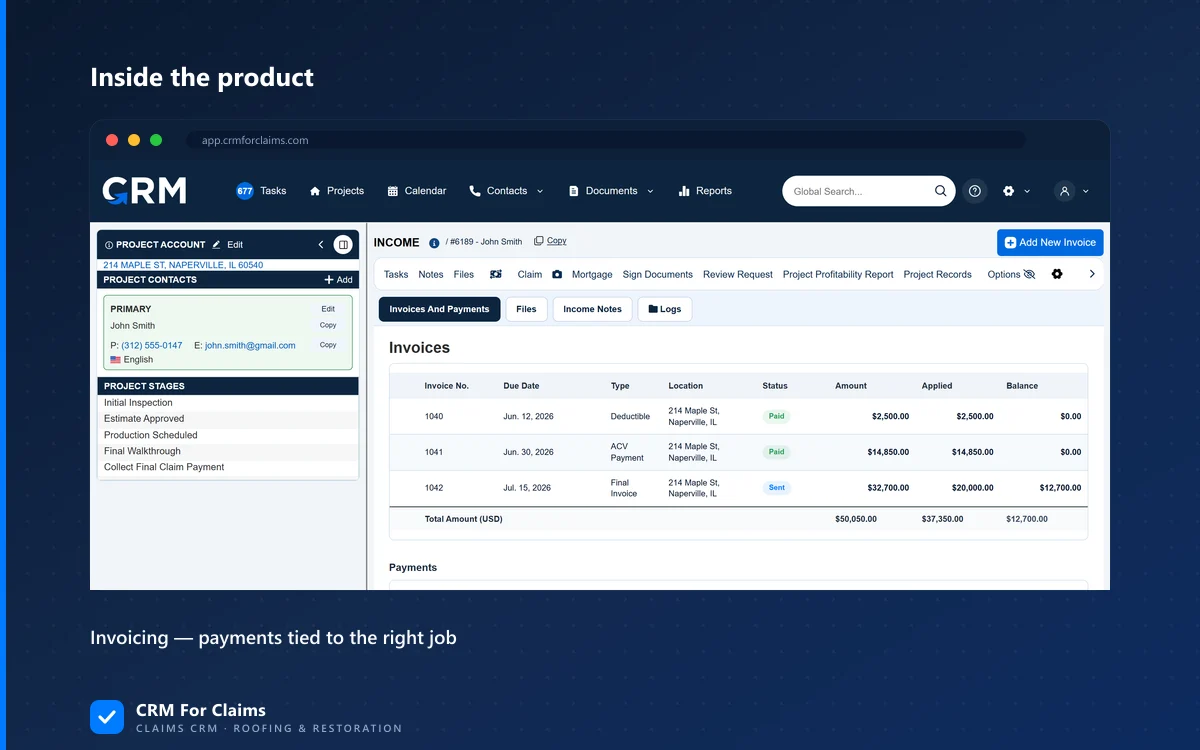
| Deductible and payment status | What the homeowner still owes and whether it has been collected | Office, and whoever holds the money conversation |
| Job cost — materials, sub invoices, crew hours | What this job is costing while it runs | Owner, production manager, bookkeeper |
| Margin and commission | What the job earns and who earns from it | Owner, office; a rep sees their own line only |
Read that third column top to bottom and the shape of the answer appears. The first row reaches almost everyone. The last row reaches almost nobody. The rows in between are the ones worth actually deciding, rather than inheriting from whatever the software defaulted to.
Who actually needs to see the approved amount?
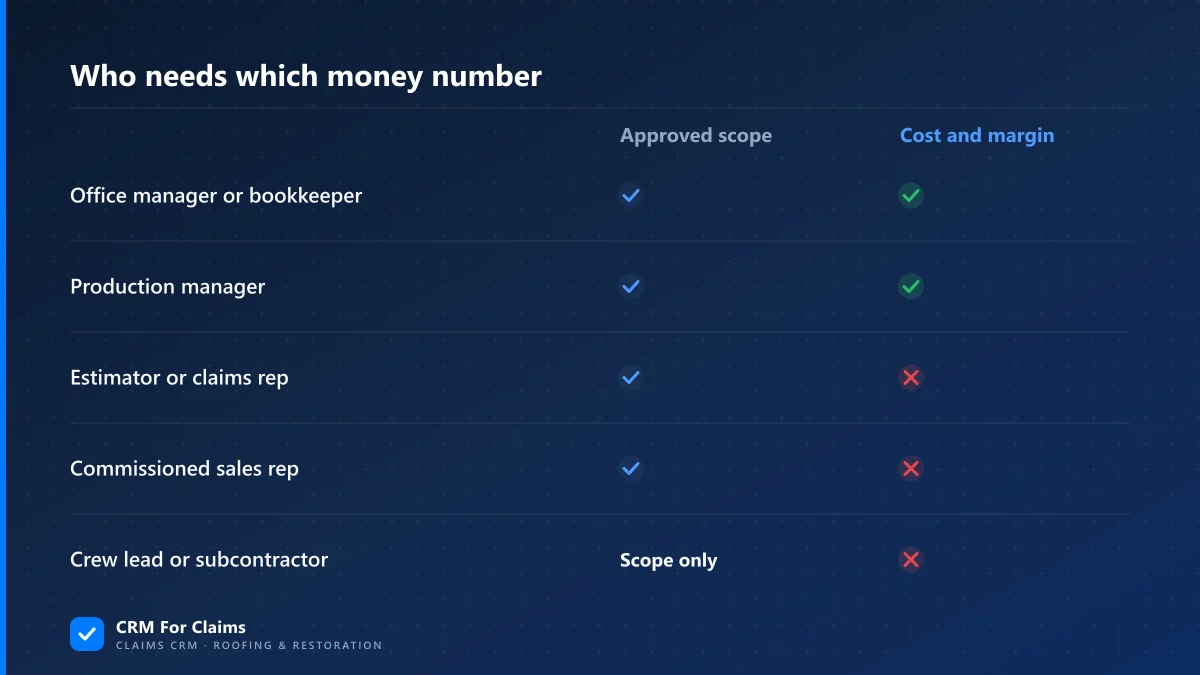
Anyone whose decisions are bounded by it — the estimator, the production manager, and the crew lead on that specific job. Hiding the approved scope from the field is what produces unbilled work: a crew building what the homeowner asked for on Tuesday morning instead of what the carrier agreed to pay for.
This is the part most people get backwards. Locking down financial visibility feels like the safe default, and on the scope line it is the expensive one. Two things break when the field cannot see what was approved.
The first is scope drift. A homeowner standing in their own driveway will ask for things, reasonably and politely, and a crew with no visibility into the approved line items has no basis for saying "that one needs to go back to the carrier first". The work gets done, and then it is either absorbed or chased through a supplement after the fact — which is a much worse position than asking the question before the tear-off, as covered in the piece on invoicing against the approved scope.
The second is that underpayments get caught by the people closest to the building. An estimator who cannot compare what was approved against what they wrote cannot spot the missing line. A crew lead who cannot see that decking was approved will not mention that there is twice as much of it as the estimate assumed. That information only exists on site, and only for a few days.
What the field does not need is the ability to change any of it. Read and write are separate decisions, and this is the clearest case for splitting them: the scope should be visible to a dozen people and editable by two.
What should stay with the owner and the office?
Costs, margin, crew pay rates and commissions. None of them change what a field decision should be, and two of them change how people behave. A rep who can see the margin on a job has everything needed to negotiate it away. A sub who can see what you pay another sub has your next rate conversation prepared for you.
Commission visibility across a sales team is worth deciding on purpose rather than discovering by accident. Some companies run genuinely open books and it works fine, because it was a decision everybody understood. Nobody has ever had a good week after reps found each other's numbers by clicking around a CRM.
Crew pay rates deserve tighter handling than anything else on this list, because they are employment data rather than claim data. They belong with whoever runs payroll, and they should not be sitting on a job record that half the company can open.
Subcontractors are a separate case worth stating plainly: a sub needs their own purchase order and their own scope, and nothing else on the claim. Not the settlement, not the other trades' numbers, not the customer's payment status. That is usually the narrowest access anyone in the whole system needs.
Why do documents leak what the fields hide?
Because the settlement is a document, not just a field. The carrier's estimate summarises replacement cost, depreciation, the deductible and the net claim in one place, usually on its first or last page. Anyone who can open the claim's document folder has read all of it, whatever the financial permissions say.
This is the single most common gap I see in a permission setup that otherwise looks careful. Fields get locked; document folders stay open to everyone on the claim, because that is how photos and signed authorizations get shared. Then the same folder holds the carrier estimate, the invoice, and the payment receipt.
Two consequences follow, and both are worth building the policy around:
- Document permissions have to match field permissions. If the approved-scope PDF is visible to a role, that role effectively has the settlement. Deciding otherwise on the field screen changes nothing except your confidence.
- Read access is functionally a copy. Anyone who can open a document can screenshot it, print it, or forward it. So the real question is never "should they see this in the app" — it is "should this person have a copy of this", which is a question you can answer honestly per role.
Messages count too. If the claim record holds the emails and texts, some of those messages contain numbers — a carrier's revised figure, a conversation about the deductible. Message visibility is part of the money question, not a separate one.
The customer portal is its own permission model in miniature, and the safest one to reason about: a homeowner login should reach exactly one claim, and every document you publish into it is a per-document decision. That trade-off, including what belongs in a portal and what does not, is the subject of the guide to customer portals on restoration jobs.
Where do permission setups actually go wrong?
Almost never in the design. In the drift. Everyone becomes an admin because one person needed one screen on a busy Friday, roles set at hire never change when people change jobs, and write access travels with read access — which is how an approved total gets overtyped by somebody trying to be helpful.
The failures repeat across companies of every size:
- Everybody is an admin. It starts as one exception on a busy day. The cost shows up somewhere other than security: nobody can say what any role means any more, so a departure, a mistake or a new hire all carry unbounded consequences.
- Read and write treated as one switch. The realistic risk from broad write access is a fat finger, not malice. Someone corrects an approved total to what they believe is right, and the invoice stops matching the carrier's paperwork three weeks later.
- Roles set at hire and never revisited. Promotions add rights; internal moves never subtract them. The estimator who covered the office for two weeks in March still has invoicing rights in November.
- One shared login for the field. It makes a handoff painless and makes every record in the system unattributable. "Who changed this?" stops having an answer for every claim, not just the ones in dispute.
- No trail on financial edits. In a four-person company one person often creates the invoice and marks it paid, and you cannot separate those duties with four people. The workable substitute is that every financial change carries a name and a timestamp, and somebody who is not that person reads the list once a month.
One more, specific to this industry: the deductible. What a contractor may say and do about a homeowner's deductible is governed by state rules, and several states prohibit outright what others allow. That makes it a topic where you want few people improvising and a written company position — a training matter more than a permissions one, but the two meet on the same screen, so check your own state's rules rather than copying a practice from a neighbouring one.
What should a claims CRM actually give you here?
Permissions by area rather than one financial switch, a real distinction between reading and editing money fields, contacts that are not user accounts, a customer login scoped to a single claim, and a name and timestamp on every financial edit. That set covers nearly every sane policy without anybody building a matrix.
The contacts point saves the most money and gets noticed the least. Adjusters, carriers, homeowners and most crews are contact records on the claim, not seats — so there is no permission question and no per-user cost attached to them at all. In CRM For Claims, additional users are $39 per month on top of the base plan and deactivating one credits the next invoice; the full arithmetic sits on the pricing page, and the structure of contacts, stages and documents is on the features page.
Deactivating rather than deleting a departed user matters for the same reason the audit trail does: the login stops working while their name stays attached to the inspection they did and the adjuster call they made. A deleted user takes the answer to "who approved this?" with them.
And there is a limit worth stating out loud, because no software vendor should pretend otherwise. A permission model controls what people can reach inside the system. It does nothing about a person who legitimately needs a number and chooses to share it. That is an employment agreement question, and building a tighter role will not solve it. What permissions genuinely buy you is a smaller blast radius and an answer to "who saw this, and when" — the reason a claims-specific tool models roles around claim work rather than around a sales team is covered on the comparison page.
Is this worth doing for a small team?
If you are two or three people who already know each other's numbers, no. Build nothing. The threshold is your first hire who is not going to be told your margin — usually a commissioned rep or a crew lead — and the right week to set the roles up is that one, while there are five claims to check instead of fifty.
When you do get to it, the work is smaller than it sounds. Write down your roles, take the five money items from the table above, and mark each one visible, editable or hidden per role. That is an afternoon, and it is a document you can hand to whoever configures the software. It also survives the software: if you change CRMs in three years, that page still describes your company.
The honest summary is that permissions are unglamorous plumbing that pays off twice — once when somebody leaves, and once when somebody makes a mistake and you can see exactly what happened. Everything else about them is invisible, which is precisely why they get skipped.
If you want to see how this maps onto a real team rather than a generic one, book a live walkthrough and bring your actual roster — including the sub you would rather not show your rate sheet to. Setting roles against real people takes about ten minutes and settles the argument better than any feature list.